Showing posts with label YouTube. Show all posts

Wednesday, September 3, 2014

The 2013 YouTube Marketing Guide

https://blog.kissmetrics.com/2013-youtube-marketing-guide/

How does a company that sells blenders attract over 220 million views on YouTube? How does Zappos drive over 250,000 visits a year to its website from YouTube?
With over 72 hours of footage being uploaded to YouTube every minute, how do you successfully market your business on the world’s largest video site and #2 search engine?
This guide will provide answers to those questions and much more. Whether you are a YouTube beginner or a seasoned pro, this post will serve as an in-depth guide for marketing on YouTube.

How to Set up Your YouTube One Channel

YouTube is evolving from a “video-based site to a channels-based site where subscriptions rule.” With the new One Channel layout, your branding will work across all screens, you can turn non-subscribers into loyal fans, and you can show off more of your video content.
While I won’t cover all of the ways you can optimize your YouTube One Channel, I’ll cover a few of the important basics.

Create Channel Icon and Art

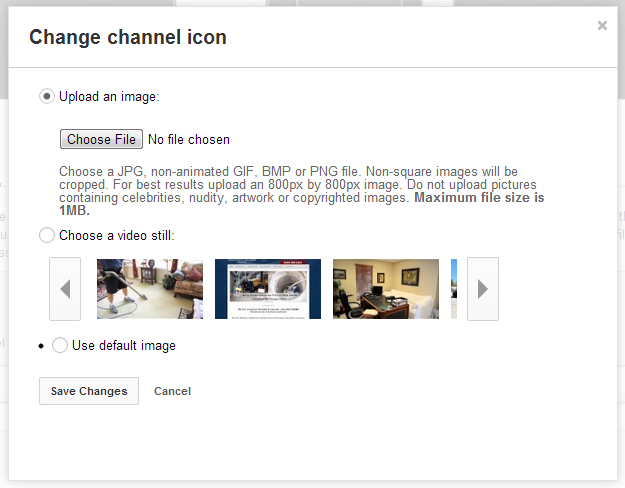
Think of your channel icon as your profile picture.
You can either upload an image or choose a still image from one of your videos.
If you upload an image (recommended), upload an 800px by 800px image.
youtube channel icon
For your channel art, YouTube recommends that you upload a single 2560px by 1440px image. This provides the best results on all kinds of screens and devices, including desktops, laptops, phones, tablets, televisions, or any other place with pixels.
youtube channel trailer

Upload a Trailer

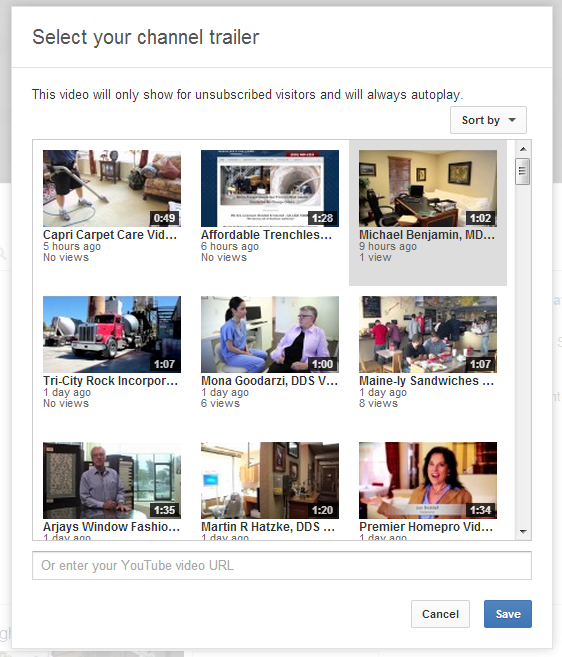
You now can feature a trailer that displays only when non-subscribers visit your channel. This video is your chance to show off your channel and encourage viewers to subscribe.
YouTube lets you select a trailer from one of your uploaded videos, or you can enter a YouTube URL.
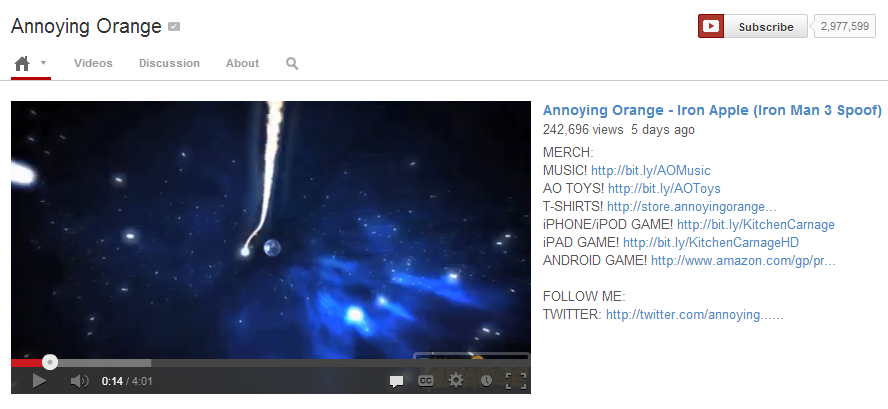
The Annoying Orange channel provides a great example of an optimized One Channel trailer. They optimized their trailer description with relevant links to purchase merchandise, download mobile games, and follow them on Twitter.
annonying orange

Add Custom and Social Links

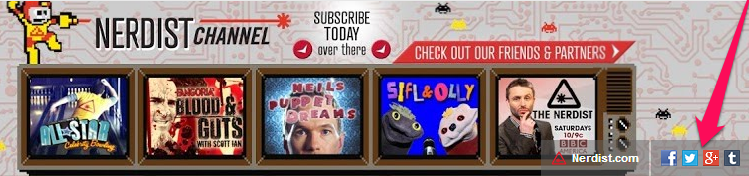
YouTube gives you the option to overlay one custom link and up to 4 social links on top of your channel art.
For the social media links, you must select from YouTube’s drop-down menu of social networks. You cannot enter in your own links, but there is a wide range of social media sites to choose from, including Google+, Twitter, Facebook, Myspace, Tumblr, Blogger, etc.
nerdist

How to Produce Effective YouTube Videos

Gone are the days when YouTube was exclusively a place for one-hit, user-generated viral videos. If you’re serious about building a successful marketing campaign on YouTube, you have to consider your channel’s long-term plan.
Are you there to educate or entertain? Are you looking to increase subscribers or attract new visitors to your website?
YouTube recently changed its algorithm. Now it gives videos and channels that retain viewers throughout an entire video more visibility in its search results and discovery (suggested videos at the end of each video and related videos on the right sidebar).
Don’t be discouraged if you have never produced a video. You don’t need an Oscar to maximize watch-time on your videos. All you need are simple video production techniques that include effective editing, quality production, and an engaging video structure.

Put Compelling Content First
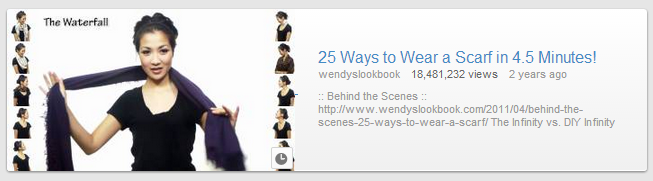
scarf video
Studies have shown that viewers decide during the first 15 seconds of a video whether they are going to keep watching or not. And, in this modern world, we are accustomed to a constant flow of information. So, you should aim to build trust or curiosity within the first 15 seconds of your video.
Here are a few ways you can quickly engage viewers:
  • Gain the trust of the viewer with a quick, animated introduction.
  • Spark the viewer’s curiosity, or tease the rest of the video, with hosts/personalities.
  • Start with a quick clip that previews what’s to come.
Having an animated introduction is a simple and effective way to build the trust of a viewer. It shows them instantly that a quality production is about to follow.
You can find some great templates over at VideoHive or get a custom one throughSmartShoot.
This is especially important if you’re doing a talking head / webcam video. Having a professional introduction captivates your audience and adds production value to an otherwise static video.
If you are creating a “how-to” type video, think about showing the final result firstand then going into the instructional steps.
Inspiring the viewer from the beginning will keep them engaged throughout your video.

Create Calls to Action
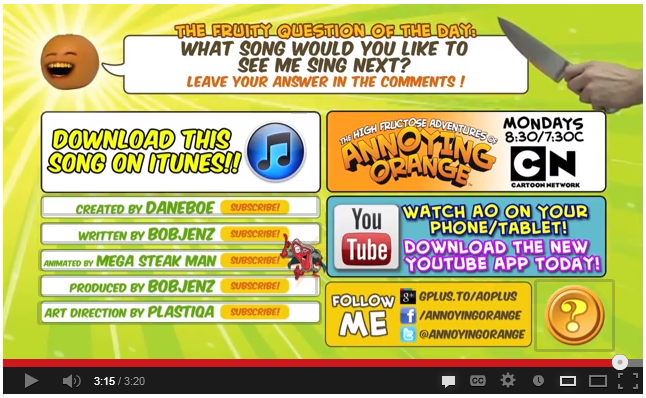
annonying orange cta
The key to a successful marketing campaign, even on YouTube, is creating clear and concise calls to action. Depending on the message, you can use the beginning, middle, or end of a video to direct the actions of your viewers.
Having too many prompts can cause confusion, so keep your CTAs minimal and simple. The goal is to make it as easy as possible for viewers to perform an action.
Here are a few important actions to use on your videos:
  • Subscribe: Give your viewer a reason to subscribe (e.g., new videos every week or never missing an episode).
  • Like / Add to Favorites / Share: Ask your viewers to “like,” “favorite,” and “share” the video so your content appears in more places across YouTube. You’ll be amazed at the reaction you get when you simply ask for it.
  • Comments: Encourage your audience to participate by asking a specific question or requesting a topic they’d like to see covered in an upcoming video.
  • Video Graphics: Create a video “end slate” that appears at the end of the video to direct viewers to your website.

Create Regular Content

Consistently updating your channel with content will keep your channel feed active, increase your presence on YouTube, and help you build an audience. You should aim for a minimum of one video per week, but the right amount of content depends on your audience, your goals, and your content.
One simple way to create a steady stream of content is to produce shorter versions of long-form content. Build a theme around a topic and then post bite-size versions of the theme on a weekly basis. This will keep your audience engaged and coming back for more.

YouTube Optimization

You’ve spent hours planning, producing, and editing just the right content for your YouTube audience. Now it’s time to grab some popcorn and watch the views roll in (Gangnam style), right? Not quite.
Remember, over 72 hours of footage is uploaded every minute on YouTube. While creating an engaging video is crucial to your success, it’s only half of the equation.
To give your videos and channel the best possible chance for success, you’ve got to optimize them.

Let’s Get Meta(Data)

Metadata is the information that encapsulates your video – the title, description, and tags. By optimizing these three components of your video, you will increase the likelihood of it showing up in YouTube’s search results, homepage, and related videos.

Title (or Headline)
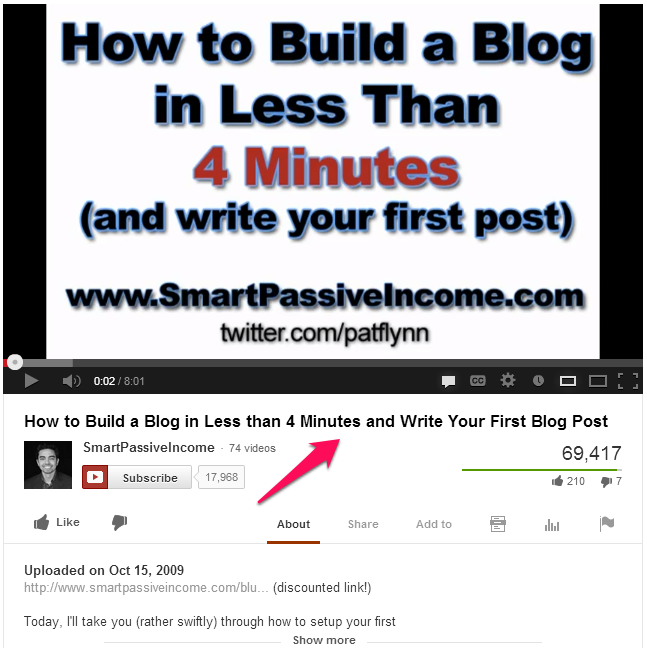
Pat Flynn
Think of your video’s title as its “headline.” Try to have a nice balance of SEO and AGO (Attention Grabbing Optimization). Be sure to keep your branding at the end and relevant keywords at the beginning.
Avoid titles that trick viewers into watching a video. This will cause a huge drop-off, which will negatively impact your video’s watch-time performance, along with its ranking.

Description
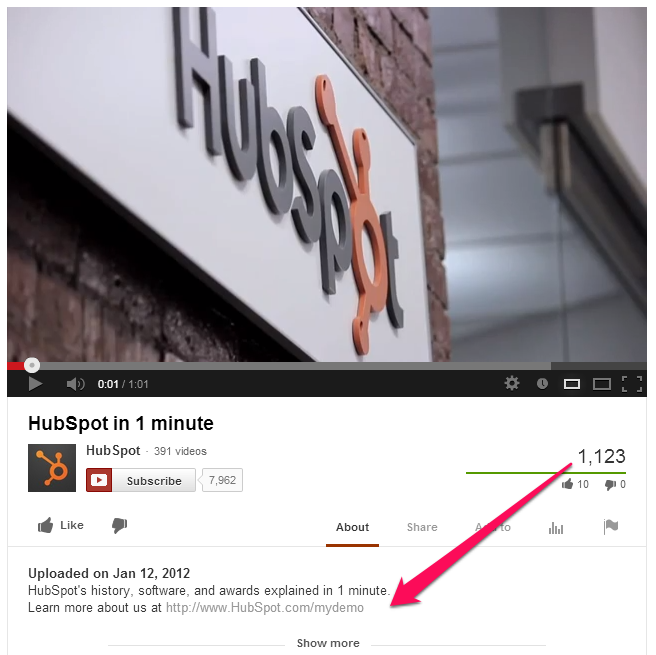
hubspot
Do NOT make the #1 mistake with your description field. You want to optimize the first 1-2 sentences with a link back to your website or landing page. This is essential because YouTube truncates your description, and only the first 2 sentences are shown when viewers watch your video.
You’ll also want to include relevant keywords here. Again, try to strike the fine balance of intriguing content that is also SEO friendly.
Next, you’ll want to end the description with URLs to other important sites, such as your social media presence, blog, website, etc.

Tags

The key to optimizing your tags is to place your important terms first. Use quotes for keyword phrases such as “video production” and provide a blend of common and long-tail keywords.
You want to provide enough tags to thoroughly and accurately describe your video. Think about what your potential viewer may be searching for on YouTube.

Thumbnails
thumbnails nerdist
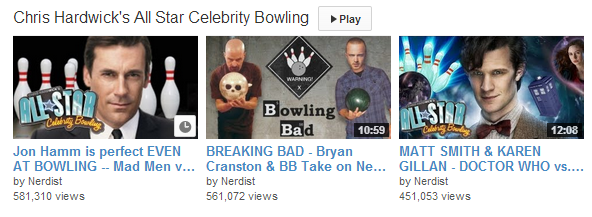
Along with your video title, thumbnails act as mini marketing banners for your videos. If your YouTube account is older than 30 days and is in good standing, you may have the ability to upload custom thumbnails for their video uploads.
If you have custom thumbnails enabled on your account, you should always upload a custom thumbnail along with the video. The right thumbnail can attract a huge audience on YouTube.
While you’re filming your video, consider what your ideal thumbnail will be, so you can take certain shots or pictures while you are on location.
Here are some general guidelines to follow:
  • Hi-resolution image (640px x 360px at a minimum)
  • Close-ups of faces
  • Looks great at both small and large sizes
  • Foreground stands out from background
  • Accurately represents the content

Annotations
nerdist cta
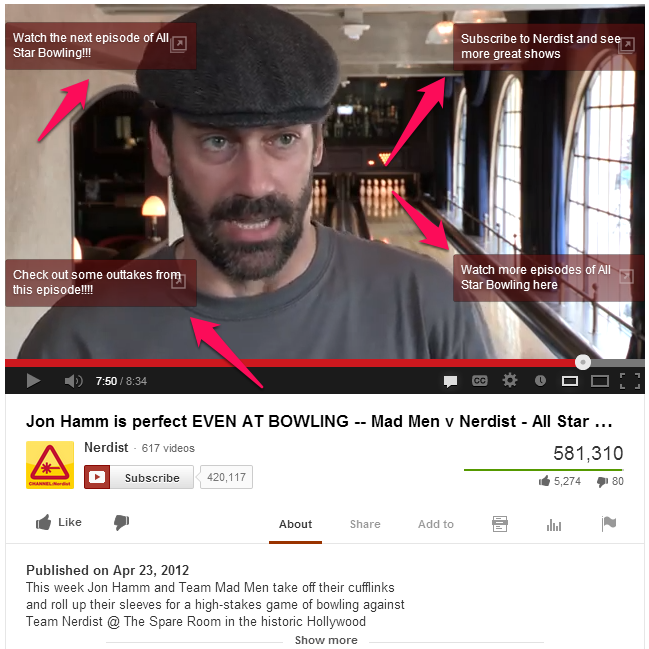
Annotations are text overlays that you can place over your videos. With annotations, you can layer text, links, and hotspots over your video to enrich the video experience with additional information, interactivity, and engagement.
Be modest with your use of annotations since too many will turn off viewers and decrease your average watch-time. Here are some ways to use them:
  • Navigate (i.e., next/previous episode, go to channel)
  • Subscribe to YouTube channel
  • Link to other YouTube videos, playlists, channels, or full versions of shorter clips
  • Encourage viewers to “like” or comment on the video
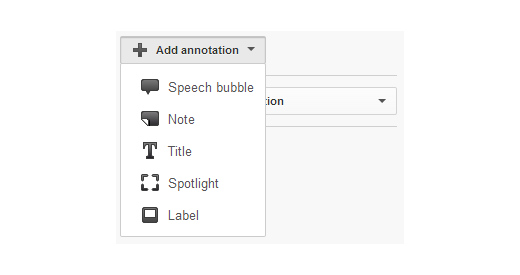
You can customize many different aspects of annotations, including size, color, type, link, and timing. Play around with the different types of annotations to find one that matches your goals.
annotations
Avoid placing annotations in the lower third of your video as the YouTube ads overlay can obscure them. Also, the embedded player can obstruct annotations along the very top of the frame.
Finally, be careful that the annotations do not get in the way of the actual content. This can seem “spammy” and may have an adverse effect.

Analytics

You cannot manage what you cannot measure. YouTube’s Analytics tool provides valuable data and insights about your content and audience.
While YouTube provides a suite of information, we’ll do a deep dive on three of the main sections – viewership, watch-time, and traffic source.

Viewership

YouTube gives you view counts for each video and channel.
Analyze your most viewed days, weeks, and individual videos to understand why they are successful. You’ll also want to investigate the causes or catalysts for the high viewership and build on them. Was it the headline? Was there something in the news that caused the spike?
Also, take a look at the comments on the video to see if you can find insightful nuggets of information.
Don’t forget to make sure the successful videos are annotated to drive subscribers, comments, and traffic to your other videos.

Watch-time

YouTube Analytics now features data for viewer watch-time on your channel and on a per-video basis. While getting views is important, knowing how long your viewers are watching your videos is a much stronger indication of how well they are performing.
Remember, YouTube is optimizing its search and discovery algorithm based on watch-time, so it’s a metric you’ll definitely want to pay attention to.
Look for videos with the highest view-duration percentages and longest total watch-times. These are the videos that you should use annotations on to promote your channel or other videos.

Traffic Source

Traffic source helps you understand how viewers discover your content on a channel and per-video level. When examining individual video traffic, you can see which other specific videos are driving views via suggested or related video placement. Use these insights to optimize your metadata, thumbnails, and tags.
“YouTube Other Features” allows you to see traffic coming from annotations.
For your top-performing videos, analyze the first 1-2 weeks after they were published to discover what may have caused the spike.

Build Your Community

In his TED talk about Why Videos Go Viral, Kevin Allocca, YouTube Trends Manager, states that community is one of the elements of a viral video. Unlike traditional video, online video is social. It is a two-way dialogue.
Keep in mind that YouTube is a social network. So, as a creator, it is essential that you interact and engage with your community. Just as you may thank your readers for comments on your blog, you should apply the same strategy to your viewers on YouTube.
An engaged community of viewers often leads to a loyal following. Unlike a blog, with video, your viewer can see and hear you, and that establishes a much deeper connection.

Cross-Promote with Other Channels

To increase your reach on YouTube, make it a priority to identify and reach out to other similar channels to cross-promote or collaborate in a mutually beneficial manner.
This doesn’t mean that you need a huge following on YouTube already. Gregory Ciotti has a great post on Think Traffic about how he worked with another YouTube channel to create a video based on a popular blog post he wrote –Science of Productivity.
That video alone increased his email subscribers by 7,000!

Promote on Social Media

Did you know that 700 YouTube videos are shared on Twitter every minute?
However, promoting your YouTube content on social media doesn’t always mean consistently pushing your content on Twitter, Google+, and Facebook.
Warby Parker cleverly replies to questions on Twitter with video and has doubled their response rate.
“People have a lot of questions about the color or the size and the shape of our glasses, and instead of just responding to them with a tweet, we’ll create a video that shows them the difference between two frames,” says Jen Rubio, Social Media Manager at Warby Parker.
To grow your social media following, think of ways to do the unexpected on the different social media platforms.
From a Google+ perspective, YouTube now allows you to use a Google+ identity for your YouTube channels. This means that all of your public channel activity – uploaded videos, created playlists, comments, “likes,” “favorites,” and subscriptions – can be attributed to your Google+ name.
Remember, the profile aligned with your channel should be created on the same Google account.

Outreach to Blogs

Don’t limit yourself to just YouTube. A lot of viewers find content on YouTube through other sites.
Mark Malkoff and his viral videos have been featured on the Today show, Good Morning America, Anderson Cooper 360, The Tonight Show with Jay Leno, and many other media outlets.
He has created such hits as the Apple Store Challenge where he performs crazy stunts at various Apple Stores to see what he can get away with.
He recommends reaching out to blogs and journalists a week before the launch of your video. Give them a sneak peek of the video so they can determine if they are interested in covering it.
Blogs, media outlets, and other websites are always looking for great content to feature. Leverage their audience and reach to grow your YouTube presence.

Conclusion

Congratulations, you made it all the way through this massive guide. Now you are set to become the next YouTube star/creator.
Apply the principles outlined here and grow your presence on YouTube. Remember, it may not work on the first try, but continuing to produce high-quality content on YouTube can deliver amazing results.
SmartShoot’s YouTube Channels have over 10 million views, Zappos receives over 250,000 visits from YouTube alone, and a blender company, Blendtec, has over 220 million views on YouTube.
Success on YouTube comes with time and practice, so get out there and shoot.
Please, also, do me a quick favor. If you would like to learn more about YouTube marketing, then leave a comment below with your questions.
About the Author: Steve P. Young is the Director of Product Marketing forSmartShoot where marketers go to get stunning photos and video from the best local photographers and filmmakers. Follow Steve on Twitter.

Create A YouTube Traffic Jam With These 4 Simple Optimization Tips

https://blog.kissmetrics.com/youtube-channel-optimization/

Did you know that YouTube is the second largest search engine after Google? As a Google product, YouTube has climbed to the top with over 4 billion videos being viewed every single day and a staggering 60 hours of video getting uploaded every minute. Uploading and marketing your videos on YouTube can help give your content visibility in both YouTube and Google search.
A YouTube channel serves as a hub for all your companies video content, allowing you to present your product, service or mission to a platform that sees over 800 million unique users visit each month. Today we’ll explore four ways to optimize your YouTube channel to ensure your videos are being discovered, watched and shared by looking at examples from existing innovators.

1. Optimize Your Videos Metadata

What is metadata you ask? Metadata is all the information you enter about a video to help clearly define the subject of a video. In terms of YouTube, the metadata makes up the title, descriptions and tags of your videos.
Optimizing these key sections of your video content will help rank your videos in both Google and YouTube. It’s important to note that content is king – if your video is the type of content your audience wants to see then these optimizations will help further a video’s reach. If your video content stinks, then optimizing your metadata is going to do very little to extend its visibility. For a worthwhile example of optimized metadata on YouTube, we’ll take a look at the Zappos YouTube channel.
How can you optimize your metadata like Zappos?

Title Your Video Correctly

Write a concise, descriptive title using key phrases that people would search to find your video. Be as natural as possible, but also incorporate YouTube’s Keyword Suggestion Tool as an approximation of how much global monthly traffic a particular key phrase receives. Make sure you choose “exact match” when doing keyword research with this tool.
In the above example, Zappos chose to title their video 5 Ways to Cuff Your Jeans! as a means of making viewers with style questions aware that Zappos is here to help style your clothing as well as offer some for sale. The title is more likely to be found by someone not searching for Zappos specifically, but more so for someone looking for help styling jeans. Zappos used the title of the video to help illustrate the video’s purpose of providing a service to viewers. In the end, helping bring the video in front of a relevant audience for Zappos.

Make Use of Your Video’s Description

Each of your videos should have a lengthy description of what the video’s content is all about. In this case, Zappos could have been lengthier in its description of this video but nonetheless they describe the contents of the video using similar keywords they used in the title.
One thing Zappos did correctly was include a URL at the very beginning of their description of this video. Always include a relevant URL to your website, whether it is a specific page or just the homepage of your website, so your viewers can find the corresponding information from your video on your company’s website.
Following the URL, include your most important keywords in the first few sentences of your description because some of your description. This is because depending on the length, gets hidden behind the show more tab. Aim to have at least a 250 word description using key phrases you’ve researched for the title of the video. Remember to keep your videos balanced with use of key phrases, while remaining natural.

Add Tags to Your Videos

Adding ten to twenty tags per video is an ideal way to make use of keywords relevant to your video but that couldn’t naturally fit in your title or description. Each tag should be a word or phrase (use mostly phrases), that are relevant to the content of the video as well as the ways in which you predict users would discover such a video. Follow Zappos examples of how to tag your videos with their use of keywords like how to, how to dress, 2012 fashion, what to wear, how to cuff your jeans etc.
Why is your video’s metadata a beneficial aspect of your YouTube strategy?
Correctly optimizing your videos title, description and tags is an important way to help YouTube and Google’s search algorithm determine the subject of your video and help it rank in the search results for relevant searches. Again, the metadata is only a small piece of the puzzle and will only help take your videos to the next level if you’ve got quality content to share with your audience.
Optimizing your metadata helps get your videos discovered by a relevant audience more likely to watch your video. The more views a video gets in a short time period of time, the higher it will rank for a variety of key phrases related to its subject. All and all, the first step to your YouTube strategy should be to follow Zappos in the steps described above and optimize your quality video content from the beginning.

2. Use Descriptive Playlists

Playlists are a feature that allows you to organize your videos on your channel into groupings based on a topic of your choice. There are a few benefits in using playlists to organize your video collections on YouTube when it comes to achieving greater visibility to your channel’s content.
Target’s YouTube channel is making wonderful use of the playlist feature when it comes to grouping videos of a similar topic, choosing a keyword focused title and correctly providing a description for the playlist.
Target Featured Playlists
How can you optimize your playlists for greater visibility in YouTube just like Target?

Begin grouping videos of a similar topic into playlists.

Target chose to group all their web exclusive content in one playlist and all their TV commercials into another. By grouping your videos together based on their topic, these videos are more likely to drive traffic between one another due to both usability and YouTube’s search algorithm. A user is more likely to watch a video of the same subject matter right after they’ve just watched a video on that topic.

Use keyword focused titles for your playlists.

YouTube’s search algorithm takes into account many factors to determine what videos show up for what keywords. Keep this in mind when naming your playlists because it’s one of the factors YouTube takes into account to determine the subject matter of a video. Keep the title short, descriptive and use YouTube’s Keyword Suggestion Tool as a reference for finding keywords with a substantial global monthly search volume. Make sure when you’re using this tool to search with exact match types and to only use it as an approximate estimate on the value of certain keywords.

Write a keyword focused, accurate description for the playlist.

This description can be a maximum of 5,000 words, allowing users to understand the subject of the playlist at a glance and YouTube’s algorithm to take into account the contents of the playlist. Target wrote one sentence describing their Current TV Spots playlist, using keywords like great commercials, exclusive online content and of course Target. Completing the same type of research for the title of your playlist is also recommended when writing the descriptions of your playlists as well.
Target Playlist Description
Why are playlists a beneficial aspect of your YouTube strategy?
Target Related Videos
Playlists are beneficial because they help facilitate more views to your content by helping define the subject matter of a video for YouTube’s search algorithm when it comes to the playlist’s title and description. Playlists even rank in Google and YouTube’s search results, providing another means of getting your content seen.
Using playlists also drive increased traffic via related videos. When viewing a video on Target’s Current TV Spots playlist, other videos from this playlist appear on the related videos sidebar to the right of the video. Since videos of a similar subject matter were placed in an optimized playlist, other videos from Target appeared and therefore are helping drive traffic to one another. Related videos are one of the most common ways to drive traffic to your existing videos, playlists help facilitate this traffic.
Also, the playlist bar automatically plays an entire playlist once you begin watching one of the videos from the selection, which provides another opportunity for more than one of your videos to be played in front of a user who you’ve already gotten the attention of. This feature doesn’t come off as abrasive because it’s very easy for a user to stop, play, pause, skip or return to your YouTube channel by interacting with the playlist bar at the bottom of the browser at anytime.
Target Autoplay Playlist Feature

3. Make the Most of Annotations

YouTube annotations are a way of adding interactive commentary to your videos. They act as a call to action on your content to help drive a viewer to complete a certain task, such as subscribing to your channel, watching more videos, pausing the video, adding a comment, following your brand on Twitter or Facebook and among many others.
Expert Village’s YouTube channel, which is part of the organization’s greater ehow network, takes the use of annotations to a new level of innovation by providing call to actions that don’t interfere with the viewers experience.
How can you add annotations to your YouTube videos just like Expert Village?
To begin adding annotations, select edit video on a video you’ve already uploaded to your channel and then select the annotations tab. In the annotations dashboard you can scroll throughout your video, selecting the timeframe where you wish to add an annotation from the add annotation drop down menu. There are six different types of annotations to help drive further interaction with your videos, each with a different purpose for optimizing your content.
Add anotations

The Speech Bubble:

This annotation acts as way of adding additional text not supplied in the video, but is still important that the user be aware of it. For instance, adding a speech bubble to someone who is talking during a video is an easy way to add additional content to what they’re already discussing.
This annotation can be especially helpful because it not only allows you to display text, but also the opportunity to add a link to another YouTube video, YouTube playlist, YouTube channel or the ability for a viewer to subscribe to your YouTube channel. Links to other websites can only be displayed in text form, requiring a user to type the URL displayed in an annotation into their browser as opposed to clicking. Unless it relevant, stick with sending traffic to other destinations within YouTube and keep links elsewhere to a minimum.

The Note:

This is one of the most usable annotations of them all. It’s a simple square that you can enter text into, as well as the links to other YouTube features like the speech bubble allows you to add. This annotation looks professional and is an easier way to present links to relevant destinations like a brand’s Twitter account or website. A marketer could utilize this annotation in a similar way to the speech bubble, but this annotation is more relevant for a variety of video content.
Expert Village’s Garden Home Challenge video uses the note annotation throughout the first nine seconds of the video as seen below. This adds a clear call to action to the beginning of the video, connecting it with the other videos in the series.
A clever innovation used in this video was after the first nine seconds of the video, when the note annotations changed over to spotlight annotations. Expert Village used both forms of annotations on this video series because note annotations draw more attention and take over more of the screen visually; therefore changing over to spotlight annotations after the first nine seconds removes the more distracting calls to action from the video experience, but still keeps them in a smaller form with the use of spotlight.
Always keeping the viewers experience in mind is the most important thing you can do and Expert Village does just this while making use of best practices for optimization.
Expert Village Annotations

The Title:

This annotation acts simply as an added function for videos without a title built into the production of the video. Users can customize the color, font and size of the title box they wish to have for their entire video or if they wish to, they can cut their video in various sections with various subtitles. This annotation is more helpful for branding purposes because it helps clarify for the user what the video is and what company is being represented.

The Spotlight:

The spotlight annotation acts similarly to the note annotation in that it allows you to link to various aspects of the YouTube network with or without text, but the only difference is it highlights a section of an existing video. Therefore, you can create aspects of your video that added with the spotlight annotation appear as custom links to your other YouTube assets. By placing the spotlight over a particular item within your video that section now acts a working link to other content.
Expert Village added a subscribe and a watch now image to the end of their video during its original production. Once the video was uploaded to YouTube, the spotlight annotation was placed over each of these images to create a custom call to action, adding a link to the appropriate next step.
Expert Village Annotations Subscribe

The Label:

The label annotation is a newer addition to the YouTube annotation family. Think of it as a combination of the spotlight and note annotation, acting as a frame with space below it for a caption and/or link.

The Pause:

The pause function freezes the video during a period of time of your choosing, then resumes the video once that pause time is over. This annotation is helpful to help emphasize a particular part of a video that may be beneficial for viewers to focus on for a longer moment than the video allows.
For instance, a user with a video with important contact information about a particular product or service may choose to give viewers more time to take down this information. This annotation would appear to be used the least, just by the nature of what it does. However, it’s still useful to highlight an important message or image about your company to consumers, so vital that the video needs a brief pause.
Why are annotations a beneficial aspect of your YouTube strategy?
Annotations are beneficial aspect of your YouTube strategy because they are a free and easy way to expand your social following, gain greater visibility and add an interactive element to your content.
Your social following can grow from your YouTube videos due to provided calls to action in your annotations like the subscribe feature, making it as simple as possible for YouTube users to receive your future YouTube content. Using a call to action is surprisingly effective, proven to increase engagement as compared to not including them in your videos. Asking your viewers to subscribe to your YouTube channel is the most successful social call to action on YouTube but that doesn’t rule out the benefit of drawing attention to your other social networks like Facebook, Twitter, Google+ and more.
Annotations allow for both increased visibility and a way for viewers to interact with your content. Expert Village’s YouTube Valentine’s Day Essentials highlights ten different Valentine’s day videos within one video using the spotlight annotation over built in features of the video. Expert Village incorporated this menu of YouTube content thru annotations in the beginning of the video, during the video and at the end of the video. Annotations used in this way help drive traffic to your content if it’s relevant, especially when highlighting videos in a series. Annotations can also help to give your viewers more ways of watching and interacting with your content as opposed to browsing elsewhere once they’ve finished watching your video.
Expert Village Valentines Day Annotations

4. Brand Your Page Consistently

Branding is important no matter the marketing channel. Many features for branding your YouTube channel are free and should be taken full advantage of. Customizing the background of your channel, showcasing your other social networks and creating a custom header are just a few of the many ways to brand your presence on YouTube.
CHOW.com YouTube Branding
How can you brand your YouTube channel just like CHOW.com?

Upload a Custom Background

Many YouTube channels have a custom background as a testament that this is the official YouTube presence of their brand. CHOW.com’s background is simple, high quality and highlighting what they do best, food. Making sure to incorporate those three tactics in creating your own YouTube background is vital. Here’s a link to download your own YouTube Photoshop Template for getting started with your own YouTube channel design with the proper dimensions courtesy of Line25.

Showcase Your Other Social Channels Everywhere

Any opportunity to showcase links to your other social networks, blogs, website etc is worth utilizing. With YouTube’s latest upgrade to the look and feel of the channel there’s new ways of displaying your other online properties. Many brands, like Oralbrush and Dell as seen below, choose to utilize the space about their channel at the top right of the dashboard as a place to link to their Twitter, Facebook, blog, website and other destinations of relevance to their YouTube audience. It also allows for a brief description of your channel which should be utilized with keywords and natural phrasing in mind, much like the optimization of your metadata above.
Oral Brush About Section
Dell About Section
This is a great use of this space, but something unique CHOW.com has done with this about section is highlight noteworthy videos and playlists. For another way to showcase your most viral, successful or otherwise important videos and playlists, make sure to add them to the about section of your YouTube channel just like CHOW.com has done so below.
CHOW About Section

Custom Banners and Layout as a Brand Channel

Customizing the banner and layout of your YouTube channel can go a long way towards improving the experience of your subscribers and viewers, but it unfortunately comes at a cost compared to these other free optimization suggestions.
If you’re a non-profit, this can be done for free but otherwise you’ll have to explore your payment options on YouTube’s brand channel product offerings page. These optimizations are often only undertaken by large companies but don’t let that dissuade you from taking on such a customization of your channel.
CHOW.com created their custom header focused around sharing a similar branded look to their website with a focus on the icons of their other social networks. Take into consideration how you can better utilize this space by taking a quick look at a couple other YouTube channel with customized channels.
PacSun YouTube Channel Banner
GoPRO Header
Walmart YouTube Banner
Why is branding your channel a beneficial aspect of your YouTube strategy?
Branding your channel helps bring a consistent experience to your viewers and subscribers on YouTube that they would see similarly reflected elsewhere. It’s important to let each marketing channel have its own feel, but also be tied together with other channels as well. Highlighting your most important videos on your channel, alongside your other social networks is a helpful way to help flaunt your digital savvy and help make it as easy as possible for your online advocates to connect with you wherever they’re active.
Those are four of the many ways innovators on YouTube are better optimizing their videos for the platform. What other innovative uses of YouTube optimization have you encountered? Share any thoughts or questions you might have in the comments below!
About the Author: Brian Honigman is the Social Media Account Manager atLunaMetrics, a Google Analytics certified partner that also specializes in social media, search engine optimization and PPC. You can follow him on Twitter@Brian_Honigman or @LunaMetrics.

How to Build Your Audience on YouTube


If I had a dollar for every time someone told me they wanted a viral video, I’d be rich. But here’s the problem…
A viral video is not a win for a brand. It’s just an amazing video. It’s a unique thing unto itself and has little to do with a brand. If you really want to use YouTube effectively, I recommend that you take the time to cultivate a channel, so your brand will have a personality.
Fundamentally, the principle boils down to regularly educating your audience or customer base on topics they care about. If you focus on consistency, you will build an extremely valuable asset – an audience your brand can rely on in the future.

Optimize for Your Audience, Not Pageviews

You don’t want to generate traffic, you want to build an audience. While the difference may seem subtle, it actually is the defining factor in this strategy. A lot of people want a “viral video” for their brand, but what happens when your viral video isn’t even hosted on your own channel? (It happened to DIRECTV.)
russian-guy
Instead of aiming for a viral video, strive to build your channel consistently. The two can go hand in hand, but the first is just generating one-time pageviews and the second involves actually building an audience.
If you have an audience, you can build a brand relationship with them. Volvo built a real audience on YouTube and was able to capitalize on that infrastructure and strategy when their video featuring Jean-Claude Van Damme went viral. The same goes for Roger Federer’s Trick Shot for Gillette.
Even if you do try to create a video for the purpose of going viral, it shouldn’t be completely unrelated to your brand. While I loved the piano staircase video, I struggled to remember the brand behind it. That’s because Volkswagen isn’t the initial brand I associate with such an event. (With that said, I like the theme they’re creating with The Fun Theory initiative, even though they’ve got their work cut out for them.) Your content – viral or not – should always connect your brand to your audience.
There are many benefits of building a channel. If you establish an active community, you will get better results on each new video because the audience will be tuning in ready to watch and share your content.
When you’re gauging success early on, any engagement is good engagement. Your likelihood of getting a subscriber on the first video is not high. You just want people to care enough to make some noise. Remember, as Dave McClure once said, “Hate is closer to love than indifference – you can’t iterate around indifference, but you can around hate.”
While pageviews and subscribers measure fundamentally different things, if I had to choose, I would say measuring subscribers is more important. If you’re ten videos in and not getting any additional traffic to your website, you’re not failing.
There’s an inherent value to brand awareness, even if it’s not on your brand property. When it’s time for a viewer to buy something you sell, they won’t have to search through generic product categories. They will be more inclined to search for your specific brand.
I’ve explained why building an audience is more important than attracting viewers, and I’ve talked a bit about the principles and metrics I focus on. Now I’d like to explore some specific techniques to make your videos more conducive to building an audience than generating pageviews.

Educate Your Viewer

While network programming like TLC prioritizes entertainment first and education second, as a brand, you should flip the script on YouTube. Put education first and entertainment second. Figure out the utility value of the content. In other words, what does the viewer get out of it?
The fundamental rule is to educate your viewer. That’s not to say you don’t have to figure out the entertainment part of it, just that it should serve as the sizzle of the educational steak.

Example 1: Bigcommerce

E-commerce software and shopping cart solution provider Bigcommerce hosts a series of educational videos on YouTube, which they’ve branded the Bigcommerce University and organized into playlists.
The majority of videos are effectively video tutorials to educate users or prospective clients of the platform, but they’ve also got a series that mainly targets marketers who want to learn the basics of SEO and keyword research, and it doesn’t sell Bigcommerce too aggressively.
Although it sounds straightforward, it has proven effective: Bigcommerce has earned over 8,600 subscribers by focusing on education.

Example 2: Beardbrand

Beardbrand is an e-commerce retailer that sells beard grooming products (e.g., oil, grooming kits, etc.). Its YouTube channel is populated with beard-related education, such as the key to finding a suitable beard style or advice on beard washing. It also informs viewers about the products in stock. Over 14,200 YouTube users have subscribed to Beardbrand’s channel because of their educational efforts.

Other best-in-class examples:

HubSpot does a great job educating and informing their audiences on YouTube. Similarly, REI does a good job connecting expert advice to interesting customer stories.

Use Consistent Characters or Themes

Having recurring characters and gags are tried-and-true methods of making content more consistent. For example, Pepsi does a good job with racing champion Jeff Gordon taking unsuspecting car salespeople on wild test drives, and with professional basketball player Kyrie Irving posing as an elderly figure named Uncle Drew schooling other players in real life.
basketball
While these videos are extremely potent in terms of virality, the most important point is the audience naturally becomes more familiar with the characters. This can present a challenge because the characters are, and should remain, just concrete examples of a larger running theme. Brands must strike the right chord when working with these characters, who are usually celebrities.
Visualize for a minute those novelty sets where a person can poke their head through a hole and become the head of a cartoon body and have their picture taken. Basically, this is the same concept. Brands need to plug celebrities into their sets and become the frame around them.
Unfortunately, most brands do the opposite. They attempt to plug themselves into the frame of the celebrity. It just doesn’t work.
Moz does a particularly good job aligning their celebrities (or thought leaders) with the company. Most of their popular videos feature a team member (usually founder Rand Fishkin) in front of a whiteboard explaining something about internet marketing.

Example 1: Free People

Free People is an online swimwear and surf gear retailer. One of its most successful formats on YouTube is the music video themed around “movement.” These videos feature characters that dance to ballet, catch waves, or practice yoga.
They also feature a regular series entitled “Free People Presents Love Stories.” Free People has gained over 26,800 subscribers and earned nearly 3 million views on YouTube.

Example 2: Nasty Gal

A natural theme to consider is a look behind the scenes. It’s been used – usually with pretty decent levels of success – for decades. E-commerce fashion retailer Nasty Gal uses behind-the-scenes videos effectively, in part because founder Sophia Amoruso built a multi-million dollar business that started as an eBay store.
These videos give viewers an opportunity to see how the Nasty Gal team functions and a chance to watch photo shoots and some of the daily operations and activities. Nasty Gal now has over 6,200 subscribers and just over 2 million YouTube views in total.

Example 3: Ecko MMA

When I was developing Ecko MMA’s (a mixed martial arts apparel brand) presence on YouTube and building their audience, I understood that the theme of fighting and martial arts videos usually was fighting and training. Instead, I ran far left with it. I wanted to capture the fighters outside the ring and show the world what they’re like when they’re not fighting.
This worked because Ecko MMA isn’t a technical brand. They don’t make boxing gloves, but rather T-shirts. People wear T-shirts to hang out, not to fight. I wanted to capture Ecko MMA’s fighters as human beings, not purely as fighters.
My belief is that even if someone is 20-30 videos in and never clicks through to the website, they see the T-shirt in the video, and the association is created. Their search process becomes more centered on Ecko MMA when they’re interested in buying new T-shirts

Other best-in-class examples:

Coca-Cola has a larger running theme of happiness. Their videos involve their product connecting people from two nations that never got along or kids having fun. Their greater challenge is capturing happiness, but I think they’ve met the challenge well. Even their Tumblr property is very happiness-centric. As another example: TOMS explains their One for One principle well on their YouTube channel.

Develop a Publishing Cadence: Leverage Economies of Scale

As you may have gathered, quantity is important when it comes to building a channel and an audience on YouTube. When you’re starting off, you most likely have a shoestring budget for testing these ideas and strategies for your brand. That’s totally understandable. Because quantity and cadence are crucial (as is consistent frequency), your strategy should be to compress as many video shoots into as few separate meetings as possible. Compress more shoots into fewer trips in order to reduce fixed costs like setup, travel, hiring, and the like.
Even for low production quality and cost, the videos can be costly. You’ll need to hire a videographer or a video team, a celebrity or a micro-celebrity, stylists, and other staff. Don’t pay $10,000 for a one-minute video. By paying another 10-20%, you can get more than triple the output.
If you’re new to YouTube, you can shoot four short videos every day for three days, which means you will have twelve videos. This is enough to last you once a week for three months, or once a month for a year. I wouldn’t recommend aiming for much more frequency than that until you have a larger budget.
Do something big enough that you believe should work, but small enough that you can try again if it doesn’t. For example, hire a local celebrity instead of bringing one in from out of town. Almost every city in the U.S. has a cool spot. Many video shoots are indoors, so your challenge would be to find a venue and light it up appropriately.

Example: Vocus

Marketing software company Vocus regularly hosts conferences and live events. As a byproduct, they’ve invited industry luminaries such as The Huffington Postco-founder Arianna Huffington and bestselling author Seth Godin to speak.
While most companies would draw the line there, Vocus films these speeches and uploads them to YouTube. Since the event is happening anyway, they just capture the dozen or so speeches throughout the conference and upload them onto YouTube as independent clips.
Similarly, B2B and SaaS companies should shoot videos with thought leaders at conferences. If necessary, negotiate publishing costs as part of the payment package. Vocus now has over 1,600 subscribers and over 400,000 views.

Other best-in-class examples:

Salesforce does this well by filming at their flagship event, Salesforce1.

Spike Interest

When you’re building an audience, you have to be interesting. Some of the best channels and themes that do well on YouTube involve entertainment, sexiness, celebrity, or how-to videos. Combine more than one of these to make them more powerful. For example, Daily HIIT is a combination of how-to and sexiness. Blendtec started off purely with entertainment, but started involving celebrities.

Example 1: NET-A-PORTER

Luxury designer fashion e-commerce retailer NET-A-PORTER has videos featuring celebrities in the fashion world, such as Christian Louboutin, Kate Moss, and Miranda Kerr. It combines these celebrities with education or how-to elements, such as Miranda Kerr sharing the recipe for her morning smoothies.
They’ve used it to great success; the channel has over 42,000 subscribers and will reach 7 million views shortly.

Example 2: Etsy

Online craft marketplace Etsy faces a media landscape saturated with competitive brands publishing many more high-budget promotional videos. Nonetheless, they’ve found an interesting gifting angle with how-to videos. For example, here’s a tutorial that shows the viewer how to create a box out of scrap paper. Etsy has gained over 35,000 subscribers and 6,200,000 views.

Other best-in-class examples:

When you’re figuring out the angle for entertainment value, have a look at videos being done in the industry and what’s working (in terms of subscribers and pageviews). For example, Shopify mixes education with various micro-celebrities (such as bestselling author Tim Ferriss and photographer Chase Jarvis). HootSuite recently newsjacked the new season of Game of Thrones (with much success).
Think within the limitations of what other brands have done successfully. For example, I was doing research on a product for young women. While I can relate to MMA, I had little idea of what’s relevant to teenage girls.
So I talked to my younger cousin, who’s fifteen, and I watched some videos on YouTube. I ended up on instructional dance videos. Immediately, I knew that was an interesting angle for the brand.
That sounds a bit formulaic, but I didn’t want to run far left because I didn’t know enough about the culture. In the future, if the instructional dance stuff works, then I’ll look into crossing different categories; for example, taking a hip hop dancer into classical music or jazz.
As you can see, this is a combination of celebrity, education, and how-to. To hit the ground running, I can start by looking at the people who do those instructional dance videos – the micro-celebrities – and ask them if they are interested in working with this brand, which is consistent with their current demographic of young women.

Use Micro-celebrities for Entertainment and Distribution

Micro-celebrities are people who haven’t been on television, but typically have a pretty significant Twitter, Instagram, or YouTube following, which means you’ll have platforms for distributing your content as soon as it’s out. At the same time, they’re not Britney Spears, so it’s not a million dollars to do a photo shoot.
shower
A funny scenario: conducting a Q&A in the shower
Because micro-celebrities often aren’t actors, I don’t recommend you try to get them to act. (In my case, they were professional athletes; personable and great on camera, but not too great with scripts.)
Instead, just set up scenarios that you – as a viewer – might find entertaining, but where the micro-celebrity can still be himself or herself and naturally be interesting. That also saves you from having to hire a scriptwriter or an editor.
When I was working with Ecko MMA, I put MMA fighter Brendan Schaub in a videowhere his phone got blended by the Blendtec guy (two micro-celebrities). Fighting’s not too difficult, so let’s try something more B2B:
If I were working for a CRM company (like Salesforce.com), I would use the communications platform as a medium for funny things that happen. While this opens up the possibility for a ton of gags, I would personally employ the celebrity or micro-celebrity approach.
Since Salesforce.com is about being organized and managing communications between salespeople and contacts, I would share a narrative where a company decides to hire a celebrity to call their customers. For example, imagine if Salesforce.com hired Michael Jordan to call their customers, but the customers didn’t believe it was Michael Jordan, and we captured their reactions on camera.
Now substitute a micro-celebrity for Michael Jordan. It’s not difficult to work backward here. Find a customer that’s fun and that you’re friendly with, and look over their social media to figure out what sports or TV shows they like. Find out if they follow any micro-celebrities – individuals with anywhere from 250,000 to 1,000,000+ followers on Instagram or Twitter.
When you’re looking for your micro-celebrity, keep in mind the size of the industry. I would happily take 10,000 followers with deep engagement over 1,000,000 followers with light engagement any day. (Look at RTs, Favs, Likes, or Comments as proxies.) Do they write their own social media posts, or do they hire an “intern” to write them? Do they react to their audience and talk or reply to them? Avoid micro-celebrities with negative associations. When in doubt, prioritize quality over quantity in this case.
One more note: when you’re working with micro-celebrities, work only with the people you get along with. I get that this may sound a bit idealistic or bizarre, but keep in mind that you could be seeing a lot of these people. You’ll have to travel with them, eat dinner with them, and hang out with them. You have to have personal chemistry with them because it will also translate into the quality and atmosphere of the video. It’s not petty or personal; it’s good business.
For example, earlier in my career, I thought I was helpful by keeping my mouth shut and playing a passive role in generating video and social content. But I happened to have an idea where a boxer would fight a wrestler and win by pinning him. So when the professional crew took a break, I took a $150 camera and shot a quick clip with these fighters.
While the quality of production was much lower than the other videos, my video did better nearly eightfold. Focus on the quality of content, and people will come running. That’s true even if it’s a commercial. Warby Parker’s on-TV commercials have been among their most popular videos.

Example 1: Rapha

Performance road-wear e-commerce retailer Rapha films their videos with a crew of cyclists known as Team Sky.
Through the behind-the-scenes activities of these micro-celebrities, Rapha shows the viewer what really goes on in the world of cycling and performance on roads. (Here’s a fascinating video on biker physiology.) Rapha has gained over 9,300 subscribers and over 1,180,000 views.

Example 2: Oracle

Larry Ellison, the co-founder of Oracle, is also one of the wealthiest people in the world. He makes a great micro-celebrity for his company, Oracle, and they use that to their advantage. Some of their most popular videos feature Ellison and have been viewed millions of times.
Your company may not be led by Larry Ellison, but still, you can allocate some resources to building the leader’s reputation and developing a sustainable micro-celebrity. Your leader will be less likely to leave the company in the long run, and the thought leadership will pay off for your organization. Oracle has over 21,400 subscribers and just under 12 million views.

Closing Thoughts

The Super Bowl is the event where viewers don’t mind commercials. Heck, they actually enjoy them. Brands know they have to invest in them. When you think about it, many viewers subscribe to channels that are, in essence, commercials. If you choose to put effort and creativity into your work, it’s possible to get people to happily watch the commercial for your product. According to Nielsen, viewers are 200% more likely to remember an ad in an online video than one seen on TV.
Remember that introduction video for Dollar Shave Club? It was a complete plug for the product, but it was extremely entertaining. I’m dying to see where he’s going with that. And the momentum, the window of opportunity, is slowly closing because there wasn’t a follow-up to it. His cadence has not played to his advantage.
Don’t chase pageviews, build your audience (slowly and steadily, if you have to). Educate your viewer, create consistent characters and themes, ensure you’re building the right cadence by leveraging economies of scale during production, and spike interest using genres and micro-celebrities. Best of luck, and have fun!
About the Author: Eric Samson is the founder of Group8A. Group8A is a Boutique Consulting firm focused on developing and executing integrated marketing and digital solutions for companies of all sizes.